
Chapter 16 · 16.1
Which backups are available at WebOké
Accidentally deleted a folder, an update that broke your website, or a hacked site? Then you'll want to go back to how things were. WebOké offers several types of backups. It's useful to know which ones there are, because they work very differently.
| Type | Who makes it? | What's in it? | Where is it stored? | Read |
|---|---|---|---|---|
| WebOké Backups | We do, automatically every night. | Your entire package: files, databases, mailboxes and settings. From every night of the past 30 days. | Encrypted on separate storage servers in a different data centre. Doesn't count towards your storage. | Can I also do this in My WebOké? WebOké Backups |
| Backup and Restore in DirectAdmin | You do, manually. | Whatever you select yourself: for example your website, mailboxes and databases. | In the backups folder in your own package. Counts towards your storage. | Backup and Restore: creating your own backup in DirectAdmin |
| Installatron backups | Installatron, automatically with updates, or you manually. | One website installed with Installatron, such as WordPress. | In your own package. Counts towards your storage. | Making and restoring backups in Installatron |
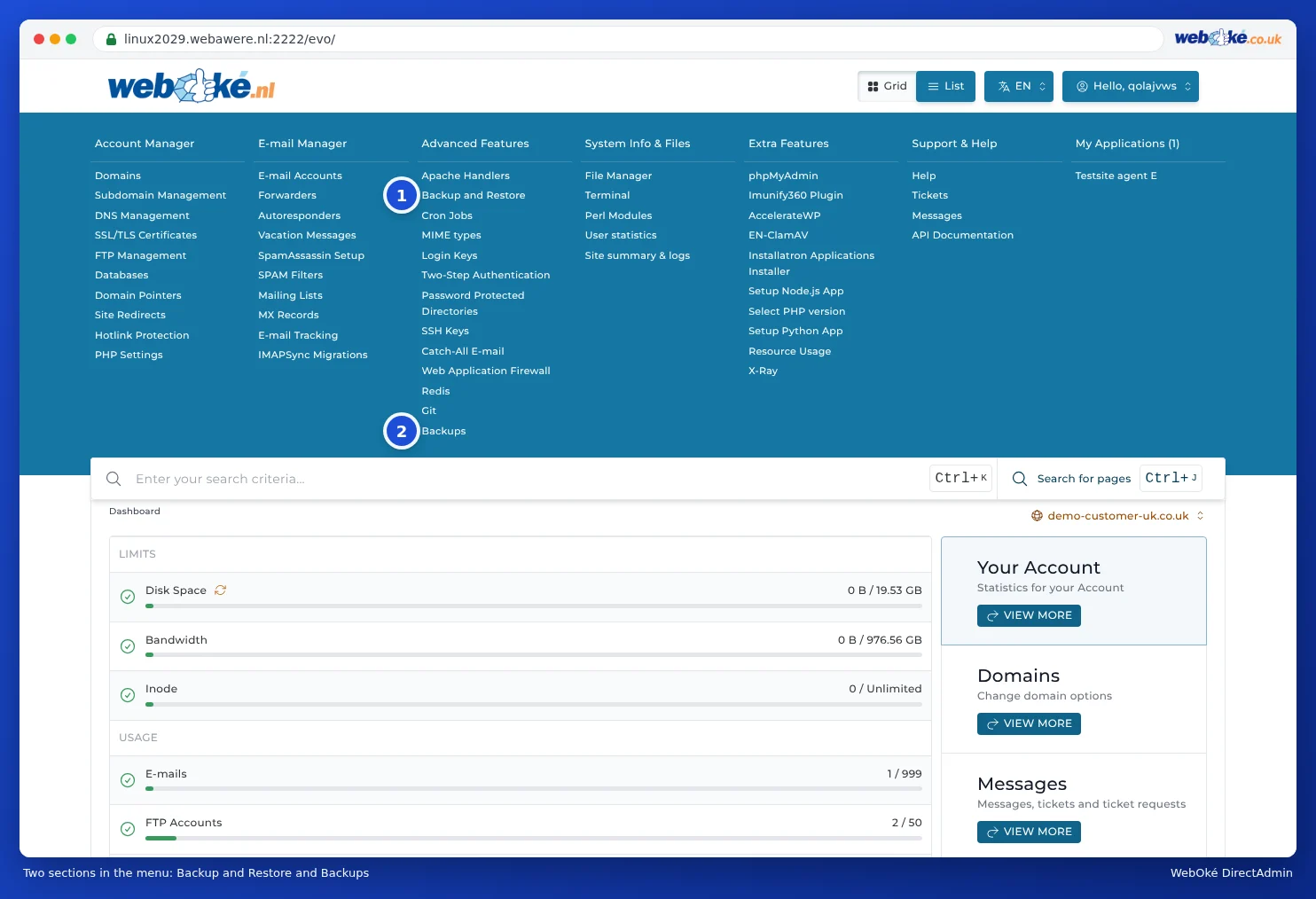
In the DirectAdmin menu, under Advanced Features, you'll find both Backup and Restore (1) and Backups (2). Backup and Restore is DirectAdmin's own feature. Backups is a shortcut to WebOké Backups in My WebOké (see The Backups section).
Which one should you use when?
- Accidentally deleted a mailbox, file or database? Use WebOké Backups. Even a mailbox you deleted in DirectAdmin can always be restored with this (see Can I also do this in My WebOké? WebOké Backups).
- Want to restore something from yesterday or last week? Use WebOké Backups. This backup is always available, even if you've never set anything up yourself. You can also restore a single file, a single database or a single mailbox, or place a copy alongside your current site.
- Want an extra restore point just before a major change? Create an extra backup in WebOké Backups with a single click (see Can I also do this in My WebOké? WebOké Backups). Or make a backup of your WordPress site in Installatron right before an update.
- Want to keep a copy yourself, for example on your computer? Download a backup from WebOké Backups, or create one with Backup and Restore and download that (see Backup and Restore: creating your own backup in DirectAdmin).
Do I need to make my own backups?
We make a complete backup of your package every night and keep it for 30 days. You don't need to set anything up for this yourself. Even so, we recommend keeping an additional copy of your own, following the 3-2-1 rule: three copies of your data, on two types of storage, with one of them kept in a different location. That way you'll have something to fall back on if you need to go back further than 30 days, or if someone gets access to your package using your login details.
- Download a backup from WebOké Backups from time to time, or create one with Backup and Restore and download that (see Backup and Restore: creating your own backup in DirectAdmin).
- Keep that copy outside your package, for example on an external drive that you then disconnect, or in other cloud storage.
- Check every now and then whether your copy is complete and whether you can open it. A backup you've never tested is a gamble.
Our backups only cover what's in your package at WebOké. Files that are only on your own computer, or emails in Microsoft 365 or Gmail, aren't included.
Please note: Backups you keep in your own package (with Backup and Restore or in Installatron) count towards your storage. If you leave a lot of them in place, your package can fill up. So be sure to clear out old backups (see Freeing up space: cleaning up old backups).